Block Kit Messages
Roam supports a subset of Slack's Block Kit for sending rich, structured messages via the chat.post API endpoint. Block Kit lets you compose messages with headers, formatted text sections, buttons, dividers, and contextual metadata — going beyond plain markdown.
Block Kit messages sent via chat.post are also returned by chat.history, with the same blocks and color fields.
Roam implements a focused subset of Slack's Block Kit. You can prototype your layouts in Slack's Block Kit Builder — just be aware that only the block types listed below are supported.
Quick Example
curl -X POST https://api.ro.am/v1/chat.post \
  -H "Authorization: Bearer $API_KEY" \
  -H "Content-Type: application/json" \
  -d '{
    "chatId": "757dfe66-37b4-4772-baa5-8c86ec68c176",
    "blocks": [
      {
        "type": "header",
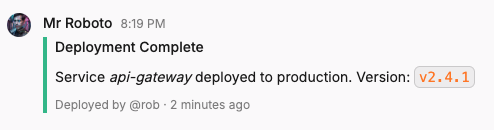
        "text": { "type": "plain_text", "text": "Deployment Complete" }
      },
      {
        "type": "section",
        "text": {
          "type": "mrkdwn",
          "text": "Service **api-gateway** deployed to production.\nVersion: `v2.4.1`"
        }
      },
      {
        "type": "context",
        "elements": [
          { "type": "mrkdwn", "text": "Deployed by @rob · 2 minutes ago" }
        ]
      }
    ],
    "color": "good"
  }'
Supported Block Types
| Block Type | Description | Key Fields |
|---|---|---|
header | Large bold heading | text (plain_text only) |
section | Text block with optional button | text (plain_text or mrkdwn), optional accessory |
context | Small metadata text | elements (array of text objects) |
divider | Horizontal rule | (none) |
actions | Row of interactive buttons | elements (array of 1–8 buttons) |
Header
Displays a large, bold text heading. Only supports plain_text (no markdown formatting).
{
  "type": "header",
  "text": { "type": "plain_text", "text": "Weekly Status Report" }
}
Section
The primary content block. Supports both plain_text and mrkdwn text, and can include an optional button accessory displayed to the right of the text.
{
  "type": "section",
  "text": {
    "type": "mrkdwn",
    "text": "*Pull Request #482*\n`feature/user-onboarding` → `main`\n3 files changed, 47 insertions(+)"
  },
  "accessory": {
    "type": "button",
    "text": { "type": "plain_text", "text": "View PR" },
    "url": "https://github.com/example/repo/pull/482"
  }
}

Context
Displays small supplementary text, useful for metadata like timestamps, authors, or status indicators. Contains an array of text objects.
{
  "type": "context",
  "elements": [
    { "type": "mrkdwn", "text": "Approved by **@alice**" },
    { "type": "plain_text", "text": "Updated 5 min ago" }
  ]
}
Divider
A simple horizontal rule to visually separate content. No additional fields.
{ "type": "divider" }
Actions
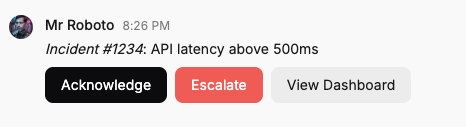
A row of up to 8 buttons. See Buttons below for the two button types (URL and interactive).
{
  "type": "actions",
  "elements": [
    {
      "type": "button",
      "text": { "type": "plain_text", "text": "Approve" },
      "action_id": "deploy_approve",
      "value": "v2.4.1",
      "style": "primary"
    },
    {
      "type": "button",
      "text": { "type": "plain_text", "text": "Reject" },
      "action_id": "deploy_reject",
      "value": "v2.4.1",
      "style": "danger"
    },
    {
      "type": "button",
      "text": { "type": "plain_text", "text": "View Logs" },
      "url": "https://monitoring.example.com/deploys/v2.4.1"
    }
  ]
}
Text Objects
Blocks use text objects to hold content. There are two types:
| Type | Formatting | Used In |
|---|---|---|
plain_text | No formatting, rendered as-is | All blocks and button labels |
mrkdwn | GitHub-flavored markdown (same dialect as chat.post text). The type name is Block Kit structural legacy — the dialect is not Slack mrkdwn. | section, context |
{ "type": "plain_text", "text": "Simple text" }
{ "type": "mrkdwn", "text": "**Bold** and *italic* with `code`" }
Roam does not parse Slack's mrkdwn dialect. Use GFM everywhere (top-level
text and mrkdwn block text):
- Bold:
**bold**(Slack*bold*renders as italic in Roam) - Italic:
*italic*or_italic_ - Strike:
~~strike~~(not Slack~strike~) - Code:
`code`
The Block Kit type is still called mrkdwn for structural parity with Slack's
builder; only the type name is shared, not the markup dialect.
Note: header blocks and button text fields only accept plain_text.
Buttons
Buttons can appear in actions blocks or as a section accessory. Every button must have one of two behaviors:
URL Buttons
Include a url field. Clicking opens the URL in a new browser tab. No server-side callback is made.
{
  "type": "button",
  "text": { "type": "plain_text", "text": "Open Dashboard" },
  "url": "https://example.com/dashboard"
}
Interactive Buttons
Include action_id and value fields (no url). When a user clicks the button, Roam sends a POST request to your app's Interactivity URL.
{
  "type": "button",
  "text": { "type": "plain_text", "text": "Approve" },
  "action_id": "approve_request",
  "value": "req-42",
  "style": "primary"
}
Interactive buttons require your app to have an Interactivity URL configured. If you send a message with interactive buttons and no Interactivity URL is set, the API returns a 400 error.
Button Styles
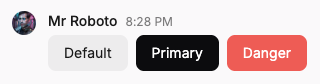
| Style | Appearance |
|---|---|
| (none) | Default neutral style |
"primary" | Green, for confirmations and primary actions |
"danger" | Red, for destructive or critical actions |
Color
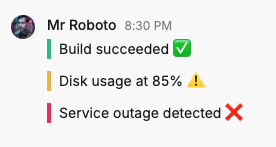
Roam supports a top-level color field on Block Kit messages. This renders as a colored vertical strip on the left side of the message — useful for indicating status at a glance.
This is a Roam extension. In Slack, color is an attachments feature and not available directly on Block Kit messages.
| Value | Color |
|---|---|
"good" | Green |
"warning" | Yellow / amber |
"danger" | Red |
"#RRGGBB" | Any hex color (e.g. "#5B3FD9") |
curl -X POST https://api.ro.am/v1/chat.post \
  -H "Authorization: Bearer $API_KEY" \
  -H "Content-Type: application/json" \
  -d '{
    "chatId": "757dfe66-37b4-4772-baa5-8c86ec68c176",
    "blocks": [
      {
        "type": "section",
        "text": { "type": "mrkdwn", "text": "Build succeeded" }
      }
    ],
    "color": "good"
  }'
Interactivity
When a user clicks an interactive button, Roam sends a POST request to your app's Interactivity URL with details about the action.
Setup
- In Roam Administration > Developer, open your API client's settings.
- Under Interactivity URL, click Add Interactivity URL.
- Enter a publicly accessible HTTPS endpoint (e.g.
https://example.com/roam/interactivity). - Save the configuration.
The interactivity URL is also the URL for App Actions.
Modal events share type: "block_actions" but carry a viewId instead of clientId.
Payload
When a button is clicked, Roam sends a POST request with a JSON body:
{
  "type": "block_actions",
  "clientId": "your-client-id",
  "user": {
    "id": "ad1e9cc0-0ffd-47e5-895c-2630a73327b4",
    "email": "alice@example.com"
  },
  "message": {
    "chatId": "295155ae-7df5-4ed5-9ebc-89a170559c81",
    "timestamp": 1765602474760032,
    "threadTimestamp": 1765602400000000
  },
  "blockId": "actions-1",
  "actionId": "approve_request",
  "value": "req-42"
}
| Field | Type | Description |
|---|---|---|
type | string | Always "block_actions" |
clientId | string | Your API client ID |
user | object | The user who clicked the button |
user.id | string | User ID |
user.email | string | Verified email address of the user |
message | object | The message containing the button |
message.chatId | string | Chat where the button was clicked |
message.timestamp | integer | Timestamp (Unix microseconds) of the message containing the button |
message.threadTimestamp | integer | Thread timestamp. Omitted if the message is not part of a thread. |
blockId | string | ID of the block containing the button |
actionId | string | The action_id from the button definition |
value | string | The value from the button definition |
Request Signing
Interactivity requests are signed using the same Standard Webhooks mechanism as webhook deliveries. Your Webhook Signing Secret from the API Client settings is used to sign interactivity requests. See the webhook documentation for verification code examples.
Timeout and Error Handling
Your endpoint must respond within 3 seconds. If your action requires longer processing, acknowledge the request immediately and process asynchronously.
| Scenario | What the user sees |
|---|---|
| 2xx response | Button is marked as clicked |
| Response takes > 3 seconds | "App didn't respond in time" |
| Connection error | "App didn't respond" |
| Non-2xx response | "App returned an error" |
Limits
| Constraint | Limit |
|---|---|
| Maximum blocks per message | 10 |
| Maximum total payload size | 8,000 bytes |
Maximum buttons per actions block | 8 |
| Mutual exclusivity | blocks cannot be combined with text or items |
Complete Example
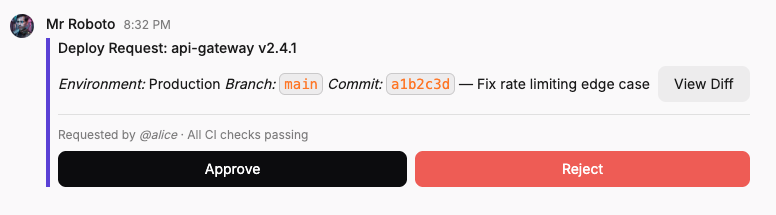
Here's a realistic deploy approval notification using multiple block types, both button types, and a color strip:
curl -X POST https://api.ro.am/v1/chat.post \
  -H "Authorization: Bearer $API_KEY" \
  -H "Content-Type: application/json" \
  -d '{
    "chatId": "757dfe66-37b4-4772-baa5-8c86ec68c176",
    "blocks": [
      {
        "type": "header",
        "text": { "type": "plain_text", "text": "Deploy Request: api-gateway v2.4.1" }
      },
      {
        "type": "section",
        "text": {
          "type": "mrkdwn",
          "text": "**Environment:** Production\n**Branch:** `main`\n**Commit:** `a1b2c3d` — Fix rate limiting edge case"
        },
        "accessory": {
          "type": "button",
          "text": { "type": "plain_text", "text": "View Diff" },
          "url": "https://github.com/example/api-gateway/compare/v2.4.0...v2.4.1"
        }
      },
      { "type": "divider" },
      {
        "type": "context",
        "elements": [
          { "type": "mrkdwn", "text": "Requested by **@alice** · All CI checks passing" }
        ]
      },
      {
        "type": "actions",
        "elements": [
          {
            "type": "button",
            "text": { "type": "plain_text", "text": "Approve" },
            "action_id": "deploy_approve",
            "value": "api-gateway-v2.4.1",
            "style": "primary"
          },
          {
            "type": "button",
            "text": { "type": "plain_text", "text": "Reject" },
            "action_id": "deploy_reject",
            "value": "api-gateway-v2.4.1",
            "style": "danger"
          }
        ]
      }
    ],
    "color": "#5B3FD9"
  }'